

Merging snapshots
LocalStack’s snapshot mechanism allows multiple snapshot files to be merged into the same emulator instance. This is useful when several teams collaborate to build a single running emulator image.
For example, a Platform team may create a snapshot containing VPCs, subnets, S3 buckets, and SSM parameters. An Application team then produces their own snapshot (building on the first) containing Lambda functions, S3 buckets, ECS images, and other application-level resources. It’s therefore important to load multiple snapshots, one on top of the other.
LocalStack supports several merge strategies for loading a snapshot into an existing emulator instance. You can think of this as loading two or more snapshots into the same emulator instance, one after the other.
The chosen strategy can be passed to lstk snapshot load either by using the --merge option, or by setting the LSTK_MERGE_STRATEGY environment variable.
lstk snapshot load --merge=<strategy> <snapshot-file>LSTK_MERGE_STRATEGY=<strategy> lstk snapshot load <snapshot-file>overwrite strategy
Section titled “overwrite strategy”This strategy completely resets the state of the instance before loading each new snapshot. This results in the instance containing the new snapshot’s content, with resources from the older snapshot being discarded.
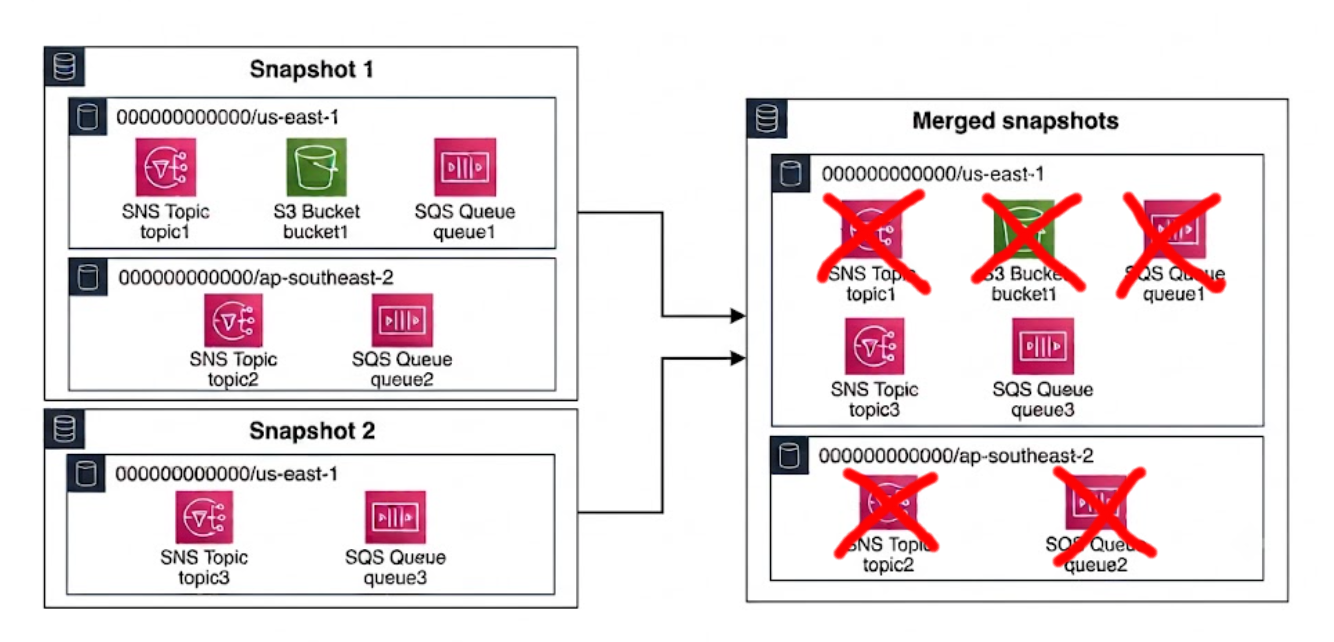
For this merge strategy, use the following:
lstk snapshot load snapshot1lstk snapshot load --merge=overwrite snapshot2lstk status [...] SNS topic3 us-east-1 000000000000 SQS http://sqs.us-east-1.localhost.localstack.cloud:4566/000000000000/queue-3 us-east-1 000000000000account-region-merge strategy (default)
Section titled “account-region-merge strategy (default)”This strategy merges snapshots at the service level, for any given account and region. For example, if the first snapshot contains an SQS queue (queue-1) in the 000000000000/us-east-1 account and region, and the second snapshot contains a different SQS queue (queue-3), also in the 000000000000/us-east-1 account and region, the first snapshot’s SQS resources are discarded. This strategy does not consider whether the SQS queues have different names, since all SQS resources in that account/region are discarded.
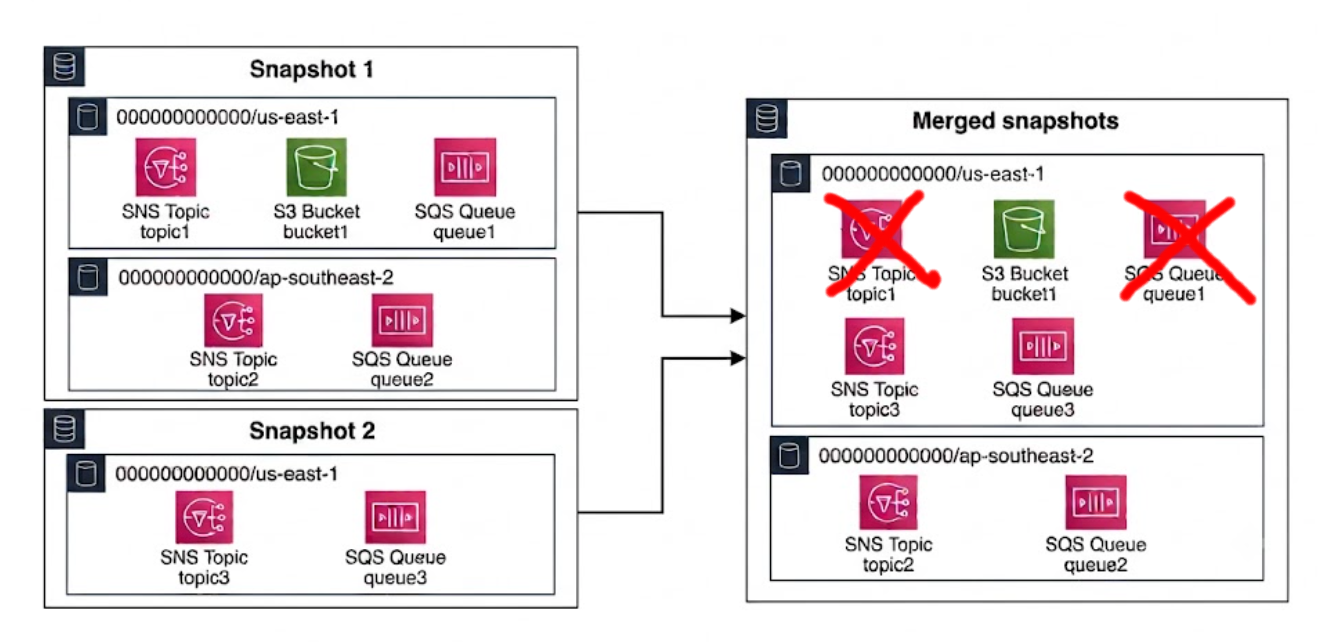
For this merge strategy, use the following:
lstk snapshot load snapshot1lstk snapshot load --merge=account-region-merge snapshot2lstk status [...] S3 bucket1 global 000000000000 SNS topic2 ap-southeast-2 000000000000 SNS topic3 us-east-1 000000000000 SQS http://sqs.ap-southeast-2.localhost.localstack.cloud:4566/000000000000/queue-2 ap-southeast-2 000000000000 SQS http://sqs.us-east-1.localhost.localstack.cloud:4566/000000000000/queue-3 us-east-1 000000000000service-merge strategy
Section titled “service-merge strategy”This strategy performs fine-grained merging, similar to the account-region-merge strategy, but also considers the names of resources. For example, if each snapshot contains an SQS queue, but the queues have different names (queue-1 vs queue-3), the merge contains both queues. If the names are the same, the resource from the newer snapshot is kept.
This is the same behavior you’d expect if you applied two infrastructure-as-code stacks, one on top of the other.
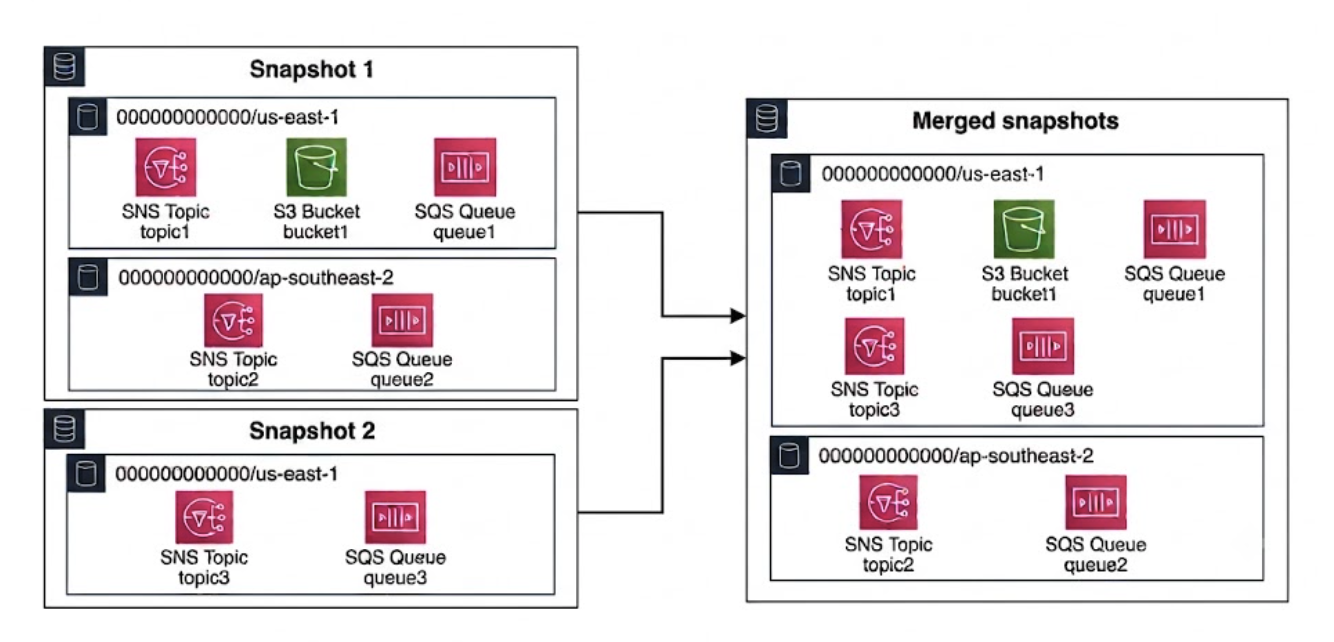
For this merge strategy, use the following:
lstk snapshot load snapshot1lstk snapshot load --merge=service-merge snapshot2lstk status [...] S3 bucket1 global 000000000000 SNS topic1 us-east-1 000000000000 SNS topic2 ap-southeast-2 000000000000 SNS topic3 us-east-1 000000000000 SQS http://sqs.ap-southeast-2.localhost.localstack.cloud:4566/000000000000/queue-2 ap-southeast-2 000000000000 SQS http://sqs.us-east-1.localhost.localstack.cloud:4566/000000000000/queue-1 us-east-1 000000000000 SQS http://sqs.us-east-1.localhost.localstack.cloud:4566/000000000000/queue-3 us-east-1 000000000000